📋 Documentation Version Notice
You're reading the documentation for a development version (master). For the latest released version, please have a look at v1.7.2.
Developer Getting Started
Tip
🎥 BIOMERO Videos: Start with the conceptual introduction or explore the short technical architecture clips.
Quick Setup for Development
Clone the repository and set up your development environment:
git clone --recurse-submodules https://github.com/Cellular-Imaging-Amsterdam-UMC/NL-BIOMERO.git
cd NL-BIOMERO

# Setup environment
# Edit .env with your configuration if needed

# Start development containers (web server will NOT be running yet)
docker-compose -f docker-compose-dev.yml up -d --build

# Clone OMERO.biomero plugin for development
cd ..  # Go to parent directory (both repos must be in same parent folder)
git clone https://github.com/NL-BioImaging/OMERO.biomero.git
cd OMERO.biomero

# Build the frontend (required before starting web server)
cd webapp
# On Windows:
corepack yarn install
corepack yarn build
# On Linux:
# yarn install
# yarn build
cd ..

# Start OMERO web server (use WSL on Windows)
./omero-init.sh

# OMERO web is now available through Nginx at localhost:4080
Development Features
The development compose file includes:
Containers that don’t exit when web server stops (for easier development)
Development-specific configurations
Special container setup for easier debugging
Integration with local OMERO.biomero development
Note
Important: The -dev compose file starts containers but not the web
server. The web server is controlled by OMERO.biomero’s ./omero-init.sh
script.
Note
Frontend Build Required: Before running ./omero-init.sh, you must build
the OMERO.biomero frontend assets. On Windows, you may need to install
corepack and yarn first.
Note
For detailed OMERO.biomero setup (including Node.js/yarn installation) and development workflow, see the OMERO.biomero Setup and Development Guide.
Architecture Overview
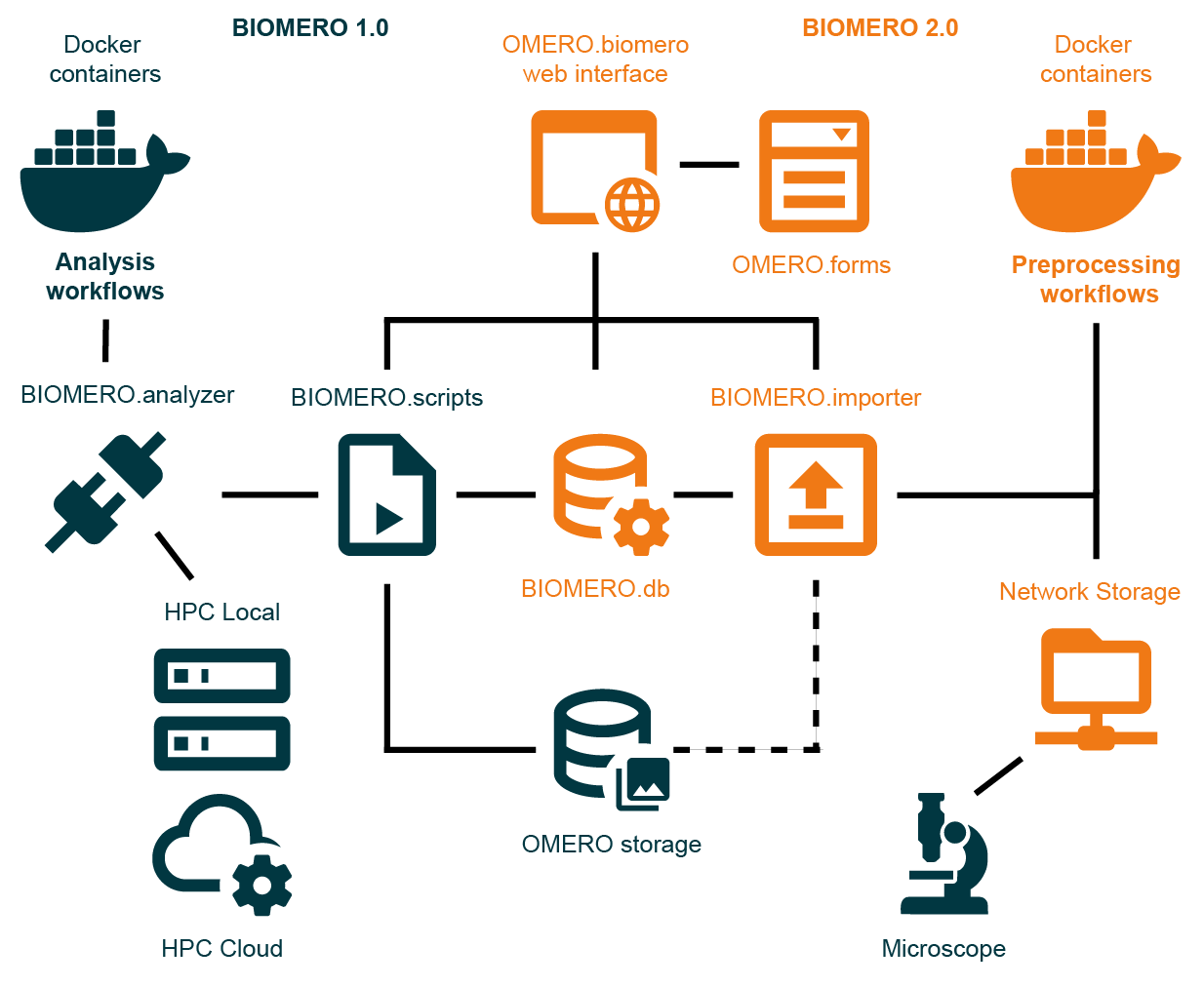
BIOMERO 2.0 architecture showing the integration of containerized analysis workflows (BIOMERO 1.0), preprocessing workflows (BIOMERO 2.0), and the unified OMERO.biomero web interface with OMERO.forms for metadata collection.
See Architecture Overview for the component boundaries, import and analysis pipelines, monitoring, and workflow-development model.
Deployment Documentation
Development & Demo Setup for a detailed development environment
Advanced Deployment Guide for production deployment
Linux/Ubuntu Deployment for Linux-specific deployment guidance
Repository README for the project-level introduction and quick-start commands