Preparing training data for an AI model
Authors: Maarten Paul
Learning goals
Prepare training data
Use public imaging data to train an AI model
The code for interaction with IDR is based on the notebooks provided by the IDR at https://
Public repositories like IDR (https://
IDR data can be explored via a public OMERO instance. It is also possible to access the raw data in Python and use it to prepare training data or training of AI models.
In this tutorial we will use some images part of a large Cell Painting screen.
The goal of this tutorial train an AI model to segment nuclei from the actin (phalloidin) channel. This would allow in future experiments to leave out the DAPI channel for another marker. We can use the DAPI channel available in the data to create ground-truth segmentations.
Explore the data here in your browser: https://
The paper related to the data is linked directly in the IDR, you can try to find it in the meta data. Or you can also check it out here directly: Gustafsdottir et al. (2013)
Setup
While the IDR is based on OMERO, it is not (anymore) possible to access the data through the OMERO Python API (Application Programming Interface). Instead the data can be explored programaticaly via a web API. Then you can find the right data you like to use. The data is stored as OME-Zarr files.
# Explore data
from IPython.display import display, HTML
import requests
IDR_BASE_URL = "https://idr.openmicroscopy.org"
MAP_URL = "{base}/webclient/api/annotations/?type=map&{type}={screen_id}"
PLATES_URL = "{base}/webclient/api/plates/?id={screen_id}"

# Here we need to set the screen ID for the dataset we want to explore.
# The screen ID is a unique identifier for a specific dataset in the IDR (Image Data Resource).
# You can find the screen ID in the URL of the dataset page on the IDR website.
# For example, if the URL is "https://idr.openmicroscopy.org/webclient/?show=screen-1952", then the screen ID is 1952.
SCREEN_ID = 1952
We need to create a “http” session which we can use to extract metadata from the IDR
INDEX_PAGE = f"{IDR_BASE_URL}/webclient/?experimenter=-1"
# create http session
with requests.Session() as session:
    request = requests.Request('GET', INDEX_PAGE)
    prepped = session.prepare_request(request)
    response = session.send(prepped)
    if response.status_code != 200:
        response.raise_for_status()
print(f"Connected to IDR at {IDR_BASE_URL} with status code {response.status_code}")
Connected to IDR at https://idr.openmicroscopy.org with status code 200
Now we can print some information of the study (That information is also available on the website)
# Now we can print the metadata available on this screen
qs = {'base': IDR_BASE_URL, 'type': 'screen', 'screen_id': SCREEN_ID}
url = MAP_URL.format(**qs)
for a in session.get(url).json()['annotations']:
    namespace = a['ns']
    for v in a['values']:
        key = v[0]
        value = v[1]
        print(key, value)
Sample Type cell
Organism Homo sapiens
Study Title Human U2OS cells - compound-profiling Cell Painting experiment
Study Type high content screen
Screen Type primary screen
Screen Technology Type compound screen
Imaging Method fluorescence microscopy
Publication Title Multiplex cytological profiling assay to measure diverse cellular states.
Publication Authors Gustafsdottir SM, Ljosa V, Sokolnicki KL, Anthony Wilson J, Walpita D, Kemp MM, Petri Seiler K, Carrel HA, Golub TR, Schreiber SL, Clemons PA, Carpenter AE, Shamji AF
PubMed ID 24312513 https://www.ncbi.nlm.nih.gov/pubmed/24312513
PMC ID PMC3847047 https://www.ncbi.nlm.nih.gov/pmc/articles/PMC3847047
Publication DOI 10.1371/journal.pone.0080999 https://doi.org/10.1371/journal.pone.0080999
Release Date 2017-09-22
License CC0 1.0 https://creativecommons.org/publicdomain/zero/1.0/
Copyright Waived by Anne Carpenter
External URL https://www.broadinstitute.org/bbbc/BBBC022/
External URL http://www.cellimagelibrary.org/pages/project_20269
Annotation File idr0036-screenA-annotation.csv https://github.com/IDR/idr-metadata/blob/HEAD/idr0036-gustafsdottir-cellpainting/screenA/idr0036-screenA-annotation.csv
We can for example also ask which plates are
qs = {'base': IDR_BASE_URL, 'screen_id': SCREEN_ID}
url = PLATES_URL.format(**qs)

for p in session.get(url).json()['plates']:
    plate_id = p['id']
    print("Plate ID: {id}, Name: {name}".format(**p))
    # create a dictionary with plated id and name
Plate ID: 4403, Name: 20585
Plate ID: 5352, Name: 20586
Plate ID: 4705, Name: 20589
Plate ID: 4881, Name: 20590
Plate ID: 4883, Name: 20591
Plate ID: 4884, Name: 20592
Plate ID: 4886, Name: 20593
Plate ID: 4887, Name: 20594
Plate ID: 4889, Name: 20595
Plate ID: 4890, Name: 20596
Plate ID: 4892, Name: 20607
Plate ID: 4893, Name: 20608
Plate ID: 4895, Name: 20625
Plate ID: 4896, Name: 20626
Plate ID: 4898, Name: 20630
Plate ID: 4899, Name: 20633
Plate ID: 4900, Name: 20639
Plate ID: 4902, Name: 20640
Plate ID: 4903, Name: 20641
Plate ID: 4905, Name: 20646
WELLS_IMAGES_URL = "{base}/webgateway/plate/{plate_id}/{field}/"
plate_id = 4403

qs = {'base': IDR_BASE_URL, 'plate_id': plate_id, 'field': 0}
url = WELLS_IMAGES_URL.format(**qs)
grid = session.get(url).json()
rowlabels = grid['rowlabels']
collabels = grid['collabels']
for r, row in enumerate(grid['grid']):
    for c, cell in enumerate(row):
        if cell is not None:
            well_name = f"{rowlabels[r]}{collabels[c]}"
            print(f"Well: {well_name}, Image: {cell['id']}")
Output
Well: A1, Image: 1895787
Well: A2, Image: 1896562
Well: A3, Image: 1898848
Well: A4, Image: 1895977
Well: A5, Image: 1897192
Well: A6, Image: 1898047
Well: A7, Image: 1896535
Well: A8, Image: 1896580
Well: A9, Image: 1896049
Well: A10, Image: 1896589
Well: A11, Image: 1897282
Well: A12, Image: 1897273
Well: A13, Image: 1898533
Well: A14, Image: 1896193
Well: A15, Image: 1898479
Well: A16, Image: 1897930
Well: A17, Image: 1897615
Well: A18, Image: 1897921
Well: A19, Image: 1895986
Well: A20, Image: 1896670
Well: A21, Image: 1898650
Well: A22, Image: 1896310
Well: A23, Image: 1896895
Well: A24, Image: 1896850
Well: B1, Image: 1897093
Well: B2, Image: 1898182
Well: B3, Image: 1896796
Well: B4, Image: 1896814
Well: B5, Image: 1898929
Well: B6, Image: 1896031
Well: B7, Image: 1896859
Well: B8, Image: 1895851
Well: B9, Image: 1898308
Well: B10, Image: 1896922
Well: B11, Image: 1898056
Well: B12, Image: 1897201
Well: B13, Image: 1897723
Well: B14, Image: 1897453
Well: B15, Image: 1896157
Well: B16, Image: 1898155
Well: B17, Image: 1898317
Well: B18, Image: 1896103
Well: B19, Image: 1899118
Well: B20, Image: 1898731
Well: B21, Image: 1895806
Well: B22, Image: 1896841
Well: B23, Image: 1895824
Well: B24, Image: 1898398
Well: C1, Image: 1897129
Well: C2, Image: 1897876
Well: C3, Image: 1899064
Well: C4, Image: 1897642
Well: C5, Image: 1898956
Well: C6, Image: 1897489
Well: C7, Image: 1897030
Well: C8, Image: 1898263
Well: C9, Image: 1898668
Well: C10, Image: 1896733
Well: C11, Image: 1898974
Well: C12, Image: 1898353
Well: C13, Image: 1897606
Well: C14, Image: 1896067
Well: C15, Image: 1898020
Well: C16, Image: 1897111
Well: C17, Image: 1897228
Well: C18, Image: 1897309
Well: C19, Image: 1895905
Well: C20, Image: 1897237
Well: C21, Image: 1896544
Well: C22, Image: 1899073
Well: C23, Image: 1899172
Well: C24, Image: 1898515
Well: D1, Image: 1896301
Well: D2, Image: 1898767
Well: D3, Image: 1895941
Well: D4, Image: 1895878
Well: D5, Image: 1895923
Well: D6, Image: 1898092
Well: D7, Image: 1896382
Well: D8, Image: 1897120
Well: D9, Image: 1898920
Well: D10, Image: 1895815
Well: D11, Image: 1896166
Well: D12, Image: 1897138
Well: D13, Image: 1897939
Well: D14, Image: 1898128
Well: D15, Image: 1896715
Well: D16, Image: 1898623
Well: D17, Image: 1898029
Well: D18, Image: 1897885
Well: D19, Image: 1897660
Well: D20, Image: 1895842
Well: D21, Image: 1898965
Well: D22, Image: 1896967
Well: D23, Image: 1897849
Well: D24, Image: 1896013
Well: E1, Image: 1897516
Well: E2, Image: 1897579
Well: E3, Image: 1897021
Well: E4, Image: 1896742
Well: E5, Image: 1897813
Well: E6, Image: 1897696
Well: E7, Image: 1897732
Well: E8, Image: 1898119
Well: E9, Image: 1898551
Well: E10, Image: 1897417
Well: E11, Image: 1896022
Well: E12, Image: 1896436
Well: E13, Image: 1897084
Well: E14, Image: 1897831
Well: E15, Image: 1898137
Well: E16, Image: 1896094
Well: E17, Image: 1897651
Well: E18, Image: 1898272
Well: E19, Image: 1898866
Well: E20, Image: 1896328
Well: E21, Image: 1896868
Well: E22, Image: 1898290
Well: E23, Image: 1898488
Well: E24, Image: 1898992
Well: F1, Image: 1899181
Well: F2, Image: 1897948
Well: F3, Image: 1895887
Well: F4, Image: 1898236
Well: F5, Image: 1895995
Well: F6, Image: 1896616
Well: F7, Image: 1897552
Well: F8, Image: 1896238
Well: F9, Image: 1896499
Well: F10, Image: 1897039
Well: F11, Image: 1897408
Well: F12, Image: 1896004
Well: F13, Image: 1898218
Well: F14, Image: 1898884
Well: F15, Image: 1896076
Well: F16, Image: 1898695
Well: F17, Image: 1897012
Well: F18, Image: 1896130
Well: F19, Image: 1897147
Well: F20, Image: 1897210
Well: F21, Image: 1896400
Well: F22, Image: 1896643
Well: F23, Image: 1897156
Well: F24, Image: 1897714
Well: G1, Image: 1896940
Well: G2, Image: 1895833
Well: G3, Image: 1896409
Well: G4, Image: 1898560
Well: G5, Image: 1898407
Well: G6, Image: 1896517
Well: G7, Image: 1896652
Well: G8, Image: 1897858
Well: G9, Image: 1898227
Well: G10, Image: 1898452
Well: G11, Image: 1898641
Well: G12, Image: 1898371
Well: G13, Image: 1898164
Well: G14, Image: 1898776
Well: G15, Image: 1898344
Well: G16, Image: 1896085
Well: G17, Image: 1897048
Well: G18, Image: 1899028
Well: G19, Image: 1898758
Well: G20, Image: 1898740
Well: G21, Image: 1896481
Well: G22, Image: 1898614
Well: G23, Image: 1899010
Well: G24, Image: 1898785
Well: H1, Image: 1896823
Well: H2, Image: 1896598
Well: H3, Image: 1898416
Well: H4, Image: 1897444
Well: H5, Image: 1898083
Well: H6, Image: 1896283
Well: H7, Image: 1897471
Well: H8, Image: 1897984
Well: H9, Image: 1896391
Well: H10, Image: 1896994
Well: H11, Image: 1897525
Well: H12, Image: 1896679
Well: H13, Image: 1899091
Well: H14, Image: 1898335
Well: H15, Image: 1896220
Well: H16, Image: 1896040
Well: H17, Image: 1898794
Well: H18, Image: 1898002
Well: H19, Image: 1897174
Well: H20, Image: 1896175
Well: H21, Image: 1896490
Well: H22, Image: 1898281
Well: H23, Image: 1898245
Well: H24, Image: 1896229
Well: I1, Image: 1897426
Well: I2, Image: 1898569
Well: I3, Image: 1896184
Well: I4, Image: 1896355
Well: I5, Image: 1896724
Well: I6, Image: 1895914
Well: I7, Image: 1896976
Well: I8, Image: 1898839
Well: I9, Image: 1898380
Well: I10, Image: 1898425
Well: I11, Image: 1897759
Well: I12, Image: 1897633
Well: I13, Image: 1896688
Well: I14, Image: 1897678
Well: I15, Image: 1897561
Well: I16, Image: 1895860
Well: I17, Image: 1899154
Well: I18, Image: 1897570
Well: I19, Image: 1896877
Well: I20, Image: 1899109
Well: I21, Image: 1897912
Well: I22, Image: 1897066
Well: I23, Image: 1896139
Well: I24, Image: 1896769
Well: J1, Image: 1898578
Well: J2, Image: 1898299
Well: J3, Image: 1896661
Well: J4, Image: 1897822
Well: J5, Image: 1897372
Well: J6, Image: 1896346
Well: J7, Image: 1896778
Well: J8, Image: 1899019
Well: J9, Image: 1898389
Well: J10, Image: 1898470
Well: J11, Image: 1899163
Well: J12, Image: 1899199
Well: J13, Image: 1897318
Well: J14, Image: 1898011
Well: J15, Image: 1897255
Well: J16, Image: 1896319
Well: J17, Image: 1896553
Well: J18, Image: 1897534
Well: J19, Image: 1898587
Well: J20, Image: 1898362
Well: J21, Image: 1897246
Well: J22, Image: 1897264
Well: J23, Image: 1897165
Well: J24, Image: 1898677
Well: K1, Image: 1897354
Well: K2, Image: 1895950
Well: K3, Image: 1898497
Well: K4, Image: 1898947
Well: K5, Image: 1897003
Well: K6, Image: 1898821
Well: K7, Image: 1898938
Well: K8, Image: 1896256
Well: K9, Image: 1897894
Well: K10, Image: 1897588
Well: K11, Image: 1896913
Well: K12, Image: 1899190
Well: K13, Image: 1896418
Well: K14, Image: 1897075
Well: K15, Image: 1896526
Well: K16, Image: 1896337
Well: K17, Image: 1897291
Well: K18, Image: 1897345
Well: K19, Image: 1897057
Well: K20, Image: 1896454
Well: K21, Image: 1897786
Well: K22, Image: 1896445
Well: K23, Image: 1898704
Well: K24, Image: 1898191
Well: L1, Image: 1896373
Well: L2, Image: 1897390
Well: L3, Image: 1896364
Well: L4, Image: 1896904
Well: L5, Image: 1897381
Well: L6, Image: 1897480
Well: L7, Image: 1898857
Well: L8, Image: 1896949
Well: L9, Image: 1895788
Well: L10, Image: 1897768
Well: L11, Image: 1896211
Well: L12, Image: 1895959
Well: L13, Image: 1896805
Well: L14, Image: 1898632
Well: L15, Image: 1898443
Well: L16, Image: 1898524
Well: L17, Image: 1897957
Well: L18, Image: 1898812
Well: L19, Image: 1898461
Well: L20, Image: 1898173
Well: L21, Image: 1897300
Well: L22, Image: 1898101
Well: L23, Image: 1899037
Well: L24, Image: 1897462
Well: M1, Image: 1896607
Well: M2, Image: 1897705
Well: M3, Image: 1898686
Well: M4, Image: 1898893
Well: M5, Image: 1896247
Well: M6, Image: 1898713
Well: M7, Image: 1897183
Well: M8, Image: 1897597
Well: M9, Image: 1898200
Well: M10, Image: 1898110
Well: M11, Image: 1897966
Well: M12, Image: 1898596
Well: M13, Image: 1899046
Well: M14, Image: 1898074
Well: M15, Image: 1896463
Well: M16, Image: 1898803
Well: M17, Image: 1897624
Well: M18, Image: 1896292
Well: M19, Image: 1896751
Well: M20, Image: 1897399
Well: M21, Image: 1897903
Well: M22, Image: 1897327
Well: M23, Image: 1899217
Well: M24, Image: 1898902
Well: N1, Image: 1896787
Well: N2, Image: 1897867
Well: N3, Image: 1895968
Well: N4, Image: 1898605
Well: N5, Image: 1896472
Well: N6, Image: 1895932
Well: N7, Image: 1896886
Well: N8, Image: 1899136
Well: N9, Image: 1896931
Well: N10, Image: 1897363
Well: N11, Image: 1899100
Well: N12, Image: 1898722
Well: N13, Image: 1899145
Well: N14, Image: 1899001
Well: N15, Image: 1898911
Well: N16, Image: 1897975
Well: N17, Image: 1897219
Well: N18, Image: 1897435
Well: N19, Image: 1898065
Well: N20, Image: 1897336
Well: N21, Image: 1897687
Well: N22, Image: 1898326
Well: N23, Image: 1898659
Well: N24, Image: 1898146
Well: O1, Image: 1896148
Well: O2, Image: 1899208
Well: O3, Image: 1896985
Well: O4, Image: 1896058
Well: O5, Image: 1898434
Well: O6, Image: 1899082
Well: O7, Image: 1898830
Well: O8, Image: 1897993
Well: O9, Image: 1898875
Well: O10, Image: 1897669
Well: O11, Image: 1896832
Well: O12, Image: 1897498
Well: O13, Image: 1897507
Well: O14, Image: 1896427
Well: O15, Image: 1897102
Well: O16, Image: 1896274
Well: O17, Image: 1897804
Well: O18, Image: 1897543
Well: O19, Image: 1896508
Well: O20, Image: 1896571
Well: O21, Image: 1896625
Well: O22, Image: 1898542
Well: O23, Image: 1895869
Well: O24, Image: 1899226
Well: P1, Image: 1896121
Well: P2, Image: 1898506
Well: P3, Image: 1897840
Well: P4, Image: 1898038
Well: P5, Image: 1898254
Well: P6, Image: 1898983
Well: P7, Image: 1896697
Well: P8, Image: 1895896
Well: P9, Image: 1896112
Well: P10, Image: 1896202
Well: P11, Image: 1898749
Well: P12, Image: 1897795
Well: P13, Image: 1896634
Well: P14, Image: 1899055
Well: P15, Image: 1896265
Well: P16, Image: 1897777
Well: P17, Image: 1899127
Well: P18, Image: 1896760
Well: P19, Image: 1898209
Well: P20, Image: 1896706
Well: P21, Image: 1895797
Well: P22, Image: 1897741
Well: P23, Image: 1896958
Well: P24, Image: 1897750
Pick one image on check the metadata
# Now we can print the metadata available on a particular image
IMAGE_ID = 1898190
qs = {'base': IDR_BASE_URL, 'type': 'image', 'screen_id': IMAGE_ID}
url = MAP_URL.format(**qs)
for a in session.get(url).json()['annotations']:
    namespace = a['ns']
    for v in a['values']:
        key = v[0]
        value = v[1]
        print(key, value)
Cell Line U2OS
Compound Name ML9
Compound Name URL https://www.ncbi.nlm.nih.gov/pccompound?term=ML9
Compound Broad Identifier BRD-K68402494-001-04-7
Compound Broad Identifier URL https://pubchem.ncbi.nlm.nih.gov/compound/BRD-K68402494-001-04-7
Compound Broad Identifier Short BRD-K68402494
Compound Source Biomol International Inc.
Compound SMILES Clc1cccc2c(cccc12)S(=O)(=O)N3CCCNCC3
PubChem InChIKey OZSMSRIUUDGTEP-UHFFFAOYSA-N
Dose 7.70 micromolar
Organism Homo sapiens
Channels Hoechst 33342:nucleus;concanavalin A (con A) AlexaFluor488 conjugate:endoplasmic reticulumn;SYTO 14 green fluorescent nucleic acid stain:nucleoli;wheat germ agglutinin (WGA) AlexaFluor594 conjugate:Golgi apparatus and plasma membrane;phalloidin AlexaFluor594 conjugate:F-actin;MitoTracker Deep Red: mitochondria
In Annotated Set yes
GO Annotation GO:0004697 (inhibits protein kinase C activity)
Check which markers are in the image
annotations = session.get(url).json()['annotations']

meta = {k: v for a in annotations for k, v in a["values"]}

channels = [c.split(":", 1) for c in meta["Channels"].split(";")]
channels = {i: (dye.strip(), target.strip()) for i, (dye, target) in enumerate(channels)}

for i, (dye, target) in channels.items():
    print(i, dye, "->", target)
0 Hoechst 33342 -> nucleus
1 concanavalin A (con A) AlexaFluor488 conjugate -> endoplasmic reticulumn
2 SYTO 14 green fluorescent nucleic acid stain -> nucleoli
3 wheat germ agglutinin (WGA) AlexaFluor594 conjugate -> Golgi apparatus and plasma membrane
4 phalloidin AlexaFluor594 conjugate -> F-actin
5 MitoTracker Deep Red -> mitochondria
Get the URL/location of the data for the image we are interested in.
# Pick one image

IMAGE_DETAILS_URL = "{base}/api/v0/m/images/{image_id}/"
IMAGE_ID = 1898190

qs = {'base': IDR_BASE_URL, 'image_id': IMAGE_ID}
url = IMAGE_DETAILS_URL.format(**qs)

r = session.get(url).json()

# Images backed by OME-Zarr will link to the zarr data via the image externalInfo
image_details = r["data"]["omero:details"]
is_zarr = "externalInfo" in image_details and image_details["externalInfo"]["EntityType"] == "com.glencoesoftware.ngff:multiscales"

print("Is Zarr?", is_zarr)
zarr_url = None
if (is_zarr):
    externalInfo_lsid = image_details["externalInfo"]["Lsid"]
    print(externalInfo_lsid)
    zarr_url = externalInfo_lsid.replace("s3:", "https:").replace("?anonymous=true", "")
    zarr_url = zarr_url.rstrip("/")
    display(HTML(f"Open <a href='https://ome.github.io/ome-ngff-validator/?source={zarr_url}'>image in NGFF-validator</a>"))
Is Zarr? True
s3://livingobjects.ebi.ac.uk/bioimaging-integrator-data/S-BIAD855/781ac3d7-673f-47be-a4d2-3fdf3f477047/781ac3d7-673f-47be-a4d2-3fdf3f477047.zarr/B/2/8?anonymous=true
data = None
if zarr_url:
    import zarr
    import dask.array as da
    img_group = zarr.open(zarr_url)
    attrs = img_group.attrs.asdict()
    ds_paths = [ds["path"] for ds in attrs["multiscales"][0]["datasets"]]
    print("dataset paths", ds_paths)

    # Load dask array for largest dataset resolution
    data = da.from_zarr(f"{zarr_url}/{ds_paths[0]}")
    # T, C, Z, Y, X
    print("array shape", data.shape)
---------------------------------------------------------------------------
NameError Traceback (most recent call last)
Cell In[3], line 2
1 data = None
----> 2 if zarr_url:
3 import zarr
4 import dask.array as da
5 img_group = zarr.open(zarr_url)
NameError: name 'zarr_url' is not definedDisplay one of the channels
You can change the channel parameter
from matplotlib.pyplot import imshow
%matplotlib inline

channel = 3

if data is not None:
    # load the first plane (z, c, t = 0)
    extra_dims = [channel] * (data.ndim - 2)
    print("extra_dims", extra_dims)
    # we slice away any Z/C/T dims, leaving Y and X
    to_slice = (*extra_dims, slice(None), slice(None))
    plane = data[to_slice]
    print(plane.shape)
    # plane is a 2D numpy array
    imshow(plane)
---------------------------------------------------------------------------
NameError                                 Traceback (most recent call last)
Cell In[2], line 6
      2 get_ipython().run_line_magic('matplotlib', 'inline')
      3
      4 channel = 3
      5
----> 6 if data is not None:
      7     # load the first plane (z, c, t = 0)
      8     extra_dims = [channel] * (data.ndim - 2)
      9     print("extra_dims", extra_dims)

NameError: name 'data' is not defined
#Get the plane and save as a numpy array
import numpy as np
import matplotlib.pyplot as plt
# data is T, C, Z, Y, X -> pick one channel, first timepoint and z-slice
channel = 2
img = np.asarray(plane)
print("plane shape", img.shape)
plane shape (520, 696)
Prepare the labels with StarDist
To train a network we need a label image: every nucleus a different number.
We could threshold the DAPI channel and split touching nuclei with a watershed, but that needs tuning for every image, and touching nuclei are exactly where it goes wrong. On day 2 we saw that a pretrained StarDist model does this job directly, so we use that instead.
Note what we are doing here: the DAPI channel is only used to make the labels. The network we train later never sees it — its input is the phalloidin channel. That is the whole point: afterwards we can find nuclei without spending a channel on DAPI.
from stardist.models import StarDist2D
from csbdeep.utils import normalize

# Pretrained model for fluorescent nuclei, downloaded the first time it is used
model_nuclei = StarDist2D.from_pretrained('2D_versatile_fluo')
Found model '2D_versatile_fluo' for 'StarDist2D'.
Loading network weights from 'weights_best.h5'.
Loading thresholds from 'thresholds.json'.
Using default values: prob_thresh=0.479071, nms_thresh=0.3.
Prediction on one image
As on day 2, the image is normalized before prediction, and the object size has to
match what the model was trained on. These images come from a low resolution level of
the pyramid, so the nuclei are small and we may have to enlarge them with scale
rather than shrink them.
# scale > 1 enlarges the image before prediction, scale < 1 shrinks it
SCALE = 1.0

img_norm = normalize(img, 1, 99.8)
labels, _ = model_nuclei.predict_instances(img_norm, scale=SCALE)

print(f'found {labels.max()} nuclei')
found 89 nuclei
from stardist import random_label_cmap

lbl_cmap = random_label_cmap()

fig, axes = plt.subplots(1, 2, figsize=(12, 6))
axes[0].imshow(img, cmap='gray')
axes[0].set_title(f'channel {channel} (DAPI)')
axes[1].imshow(img, cmap='gray')
axes[1].imshow(labels, cmap=lbl_cmap, alpha=0.5)
axes[1].set_title(f'{labels.max()} nuclei')
for ax in axes:
    ax.axis('off')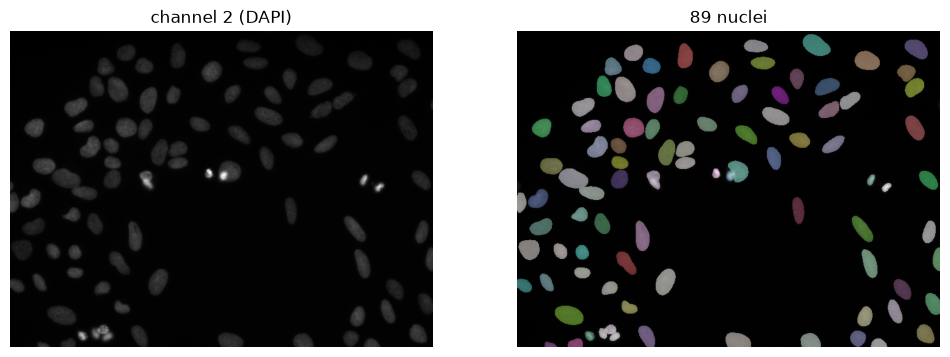
Check the size of the objects
Rather than guessing whether the scale was right, we measure the nuclei that were
found. If they are only a few pixels across, the model is working far below the size
it was trained on and SCALE should go up.
from skimage.measure import regionprops

diameters = [p.equivalent_diameter_area for p in regionprops(labels)]
print(f'median nucleus diameter: {np.median(diameters):.1f} pixels')
---------------------------------------------------------------------------
NameError Traceback (most recent call last)
Cell In[4], line 3
1 from skimage.measure import regionprops
2
----> 3 diameters = [p.equivalent_diameter_area for p in regionprops(labels)]
4 print(f'median nucleus diameter: {np.median(diameters):.1f} pixels')
NameError: name 'labels' is not definedRemove small objects
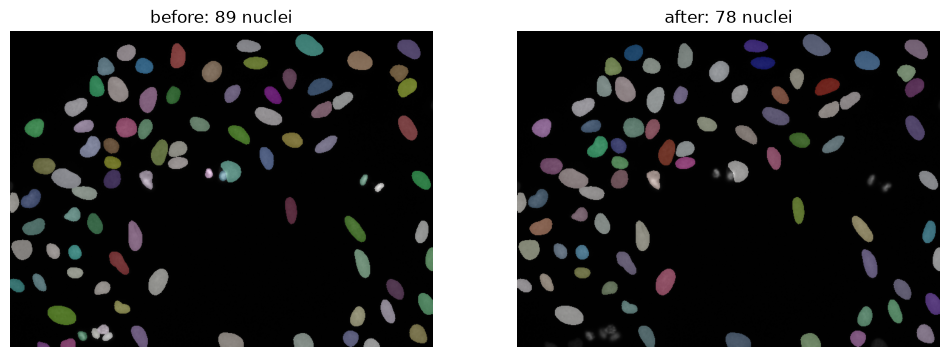
StarDist sometimes detect tiny objects: debris, bright spots or fragments of a nucleus. We do not want the network to learn these, so we remove objects that is much smaller than a typical nucleus. The minimum size is a fraction of the median area, so it follows the resolution of the image.
from skimage.morphology import remove_small_objects
from skimage.segmentation import relabel_sequential

# Objects smaller than a quarter of the median nucleus area count as debris
min_area = 0.5 * np.median([p.area for p in regionprops(labels)])


def filter_small_objects(labels, min_area=min_area):
    """Remove objects of min_area pixels or smaller and renumber the labels 1..N."""
    filtered = remove_small_objects(labels, min_size=min_area)
    return relabel_sequential(filtered)[0]


labels_filtered = filter_small_objects(labels)
print(f'minimum area: {min_area:.0f} pixels')
print(f'{labels.max()} objects before, {labels_filtered.max()} after filtering')
minimum area: 330 pixels
89 objects before, 78 after filtering
503774454.py (10): Parameter `min_size` is deprecated since version 0.26.0 and will be removed in 2.0.0 (or later). To avoid this warning, please use the parameter `max_size` instead. For more details, see the documentation of `remove_small_objects`. Note that the new threshold removes objects smaller than **or equal to** its value, while the previous parameter only removed smaller ones.
fig, axes = plt.subplots(1, 2, figsize=(12, 6))
for ax, lbl, title in zip(axes, [labels, labels_filtered], ['before', 'after']):
    ax.imshow(img, cmap='gray')
    ax.imshow(lbl, cmap=lbl_cmap, alpha=0.5)
    ax.set_title(f'{title}: {lbl.max()} nuclei')
    ax.axis('off')

# Save the filtered labels for further analysis
np.save(f'labels_{IMAGE_ID}.npy', labels_filtered)
print('saved', f'labels_{IMAGE_ID}.npy')
saved labels_1898190.npy
Creating the annotation dataset
We now repeat this for a set of images and write three folders:
training_data/images/— the phalloidin channel, the input for the networktraining_data/labels/— the StarDist nuclei instances, the target for instance segmentationtraining_data/nuclei/— the raw DAPI intensity image, the target for an image-to-image (virtual staining) model
The three folders use the same file names, so an image and its targets always belong together. Splitting this into training, validation and test sets happens in the next notebook, so that the split is a deliberate choice rather than a side effect of how the data was downloaded.
import random

TRAIN_CHANNEL = 4    # phalloidin, the input for the network
NUCLEI_CHANNEL = 2   # DAPI, used only to make the labels
N_IMAGES = 100        # more images is better, but each one has to be downloaded

# We collect all image ids
image_ids = [c['id'] for row in grid['grid'] for c in row if c is not None]
print('images in plate:', len(image_ids))

random.seed(0)  # same subset every run

#from all images in the plate we
subset = random.sample(image_ids, N_IMAGES)
images in plate: 384
# We create a function to load an image with a certain resolution from the IDR

def load_image(image_id, resolution=0):
    """Load an IDR image as a dask array (lowest resolution by default)."""
    url = IMAGE_DETAILS_URL.format(base=IDR_BASE_URL, image_id=image_id)
    lsid = session.get(url).json()['data']['omero:details']['externalInfo']['Lsid']
    zarr_url = lsid.replace('s3:', 'https:').replace('?anonymous=true', '').rstrip('/')
    paths = [ds['path'] for ds in zarr.open(zarr_url).attrs.asdict()['multiscales'][0]['datasets']]
    return da.from_zarr(f'{zarr_url}/{paths[resolution]}')
import zarr
import dask.array as da
# Download the subset once and keep it in memory (C, Y, X per image)
raw = [np.asarray(load_image(i)) for i in subset]
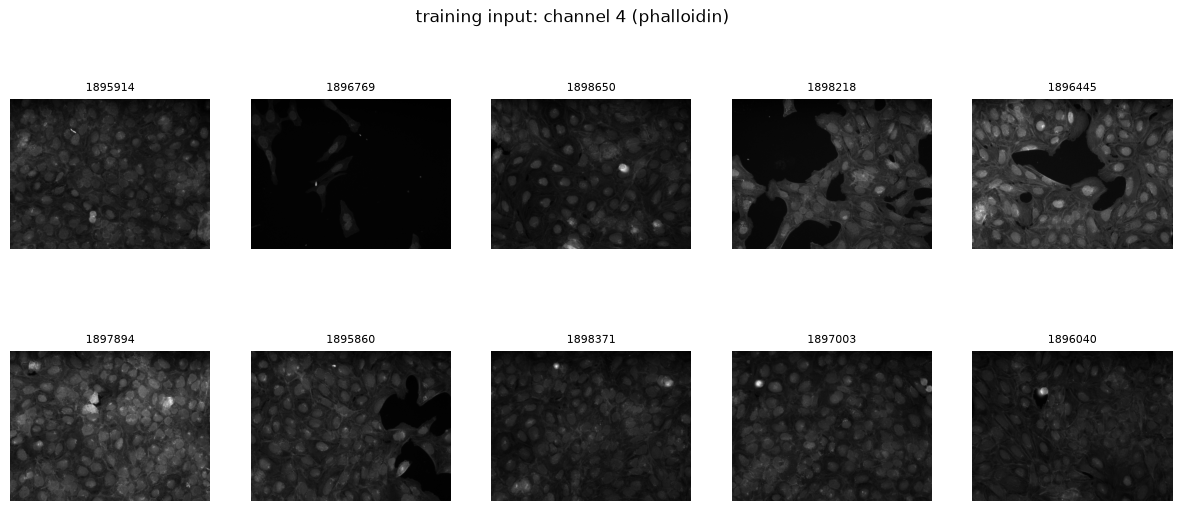
print('one image shape (C, Y, X):', raw[0].shape)
fig, axes = plt.subplots(2, 5, figsize=(15, 6))
for ax, im, image_id in zip(axes.ravel(), raw, subset):
ax.imshow(im[TRAIN_CHANNEL], cmap='gray')
ax.set_title(image_id, fontsize=8)
ax.axis('off')
fig.suptitle(f'training input: channel {TRAIN_CHANNEL} (phalloidin)')one image shape (C, Y, X): (5, 520, 696)
from pathlib import Path
import tifffile

OUT = Path('training_data')
(OUT / 'images').mkdir(parents=True, exist_ok=True)
(OUT / 'labels').mkdir(parents=True, exist_ok=True)
(OUT / 'nuclei').mkdir(parents=True, exist_ok=True)

def segment_nuclei(plane, scale=SCALE):
    """Normalize the DAPI plane and return the filtered StarDist nuclei as a label image."""
    labels, _ = model_nuclei.predict_instances(normalize(plane, 1, 99.8), scale=scale)
    labels = filter_small_objects(labels)
    return labels


def normalize_to_uint16(plane):
    """Percentile-normalize a plane and rescale it to fill the uint16 range.

    This is a cell-painting screen, so absolute DAPI brightness varies a lot between wells
    (imaging session, compound, exposure). BiaPy requires every raw image in a folder to fall
    in the same intensity "bucket" (e.g. all uint16-range, all 0-1 float): if one image happens
    to be dim enough that its raw max sits below 255, training crashes with a data-range error.
    Rescaling every image to use the full range removes that dependence on absolute brightness.
    """
    img_norm = np.clip(normalize(plane, 1, 99.8), 0, 1)
    return (img_norm * 65535).astype('uint16')


for image_id, im in zip(subset, raw):
    tifffile.imwrite(OUT / 'images' / f'{image_id}.tif', im[TRAIN_CHANNEL].astype('uint16'))
    tifffile.imwrite(OUT / 'labels' / f'{image_id}.tif', segment_nuclei(im[NUCLEI_CHANNEL]).astype('uint16'))
    # Raw DAPI intensity, kept as its own target for an image-to-image (virtual staining) model
    tifffile.imwrite(OUT / 'nuclei' / f'{image_id}.tif', normalize_to_uint16(im[NUCLEI_CHANNEL]))

print(f'wrote {len(subset)} image/label/nuclei triplets to {OUT.resolve()}')
503774454.py (10): Parameter `min_size` is deprecated since version 0.26.0 and will be removed in 2.0.0 (or later). To avoid this warning, please use the parameter `max_size` instead. For more details, see the documentation of `remove_small_objects`. Note that the new threshold removes objects smaller than **or equal to** its value, while the previous parameter only removed smaller ones.
wrote 100 image/label/nuclei triplets to /var/home/maartenpaul/Documents/GitHub/NL-BioImageAnalysis-course2026/day_3/AI_training/training_data
Metadata
We also save where each image comes from: plate, well, field, and the compound the cells were treated with. You need this to decide how to split the data: images from the same well, or the same compound, are not independent.
import csv
import re

def image_metadata(image_id):
    """Plate, well and field from the image name; compound and dose from its annotations."""
    name = session.get(f'{IDR_BASE_URL}/webclient/imgData/{image_id}/').json()['meta']['imageName']
    plate, well, field = re.match(r'(\S+) \[Well (\w+), Field (\d+)\]', name).groups()
    url = MAP_URL.format(base=IDR_BASE_URL, type='image', screen_id=image_id)
    values = {k: v for a in session.get(url).json()['annotations'] for k, v in a['values']}
    return {'image_id': image_id, 'plate': plate, 'well': well, 'field': field,
            'compound': values.get('Compound Name', ''), 'dose': values.get('Dose', '')}

metadata = [image_metadata(image_id) for image_id in subset]

with open(OUT / 'metadata.csv', 'w', newline='') as f:
    writer = csv.DictWriter(f, fieldnames=metadata[0].keys())
    writer.writeheader()
    writer.writerows(metadata)

print(f'wrote metadata for {len(metadata)} images to {OUT / "metadata.csv"}')Next
training_data/ now holds the input images and their targets. In 01_training_instance_segmentation.ipynb we
split them into training, validation and test sets and train an instance segmentation model
with BiaPy. In 02_training_image_to_image.ipynb we train a model on the same input that instead
predicts the raw DAPI (nuclei) intensity image — virtual staining.
- Gustafsdottir, S. M., Ljosa, V., Sokolnicki, K. L., Anthony Wilson, J., Walpita, D., Kemp, M. M., Petri Seiler, K., Carrel, H. A., Golub, T. R., Schreiber, S. L., Clemons, P. A., Carpenter, A. E., & Shamji, A. F. (2013). Multiplex Cytological Profiling Assay to Measure Diverse Cellular States. PLoS ONE, 8(12), e80999. 10.1371/journal.pone.0080999